
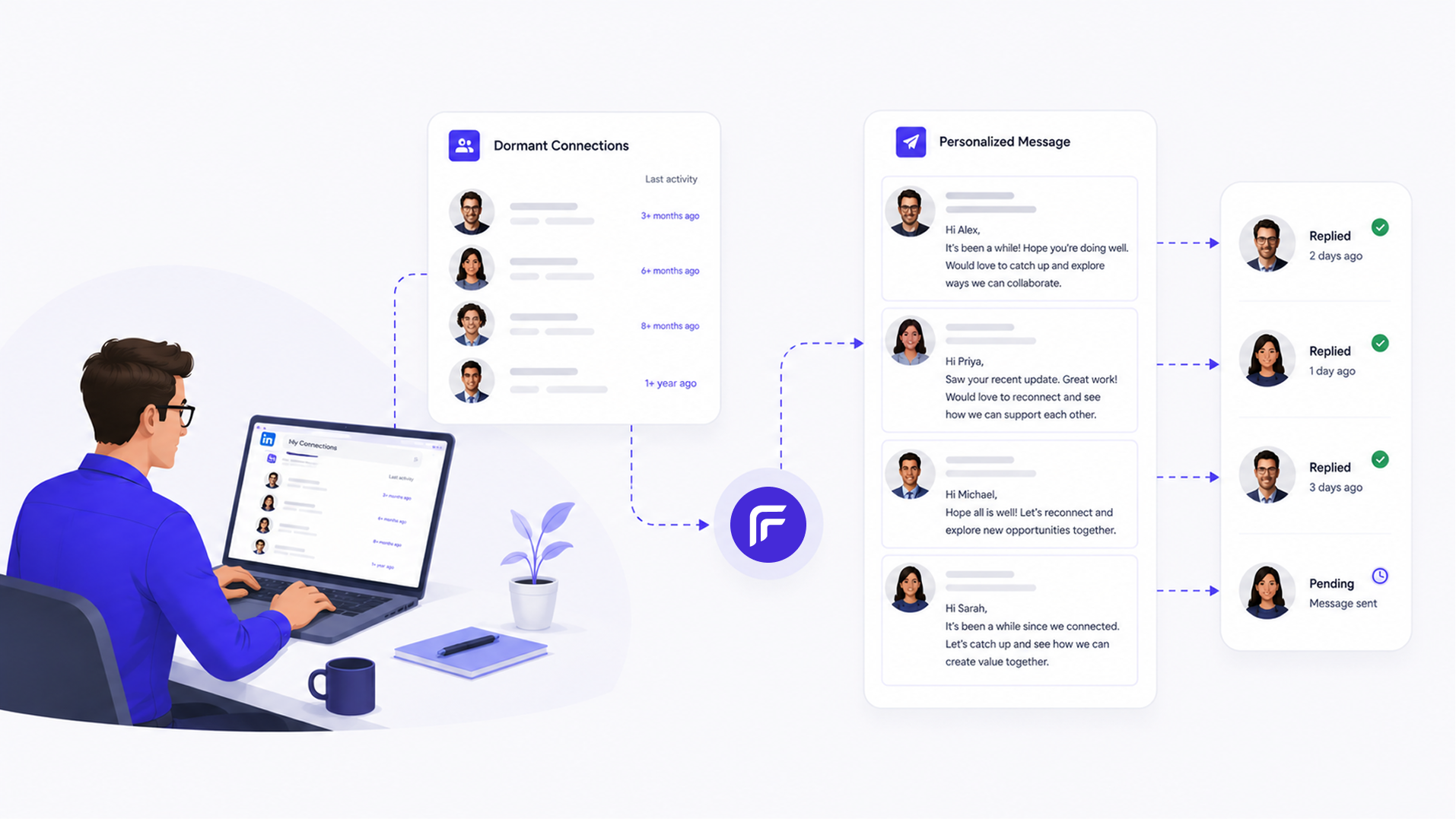
Most LinkedIn networks are underused. You have hundreds or thousands of connections from past jobs, events, and outreach who you have never followed up with. Some of those people are at companies that match exactly what you sell right now. The list already exists. The signal is there. Acting on it just requires going through connection by connection, which no one has time for.
Claude goes through the list for you. It identifies which connections are worth reaching out to now, reads their recent activity to find a relevant hook, and sends a message that does not read like a mass blast.
How to connect toflow with Claude
toflow.ai has a built-in MCP server that lets Claude control your LinkedIn outreach directly. It works with Claude Desktop, Cursor, Windsurf, or any MCP-compatible client.
Step 1: Connect your LinkedIn account to toflow
Log into the toflow app and go to Settings, then Accounts, then Connect LinkedIn. This is the account Claude will use to review your connections and send messages on your behalf.
Step 2: Connect toflow to Claude Desktop
- Open Claude Desktop, go to Settings, then Connectors, then Add Custom Connector
- Set the Name to toflow.ai and the URL to https://mcp.toflow.ai/mcp, then save
- Click Connect. Claude will open a browser window to authorize your toflow account
- Once authorized, start a conversation. Claude can now scan your connections, identify the right ones to reach out to, and send personalized messages via your account
Using Cursor, Windsurf, or another MCP client? Add this to your config file instead:
{
  "mcpServers": {
    "toflow": {
      "type": "http",
      "url": "https://mcp.toflow.ai/mcp"
    }
  }
}
Once connected, tell Claude what criteria define a worthwhile connection to re-engage and what you are reaching out about. Claude handles the rest.
What you give / What you get
What you give
- Criteria for which connections are worth re-engaging: role types, company sizes, industries, or specific companies
- Context about what you are reaching out about and your preferred tone
- Your daily sending limits
What you get
- A filtered list of connections that match your criteria
- A personalized message written per person based on their recent posts and profile
- Messages sent via your connected LinkedIn account at a human pace
- Replies tracked in your toflow inbox automatically
What this workflow does automatically
Claude pulls your LinkedIn connection list and reads each connection's current role, company, and recent activity. Based on the criteria you define, it identifies which connections are worth reaching out to now: the right role, the right company stage, the right signals.
For each qualifying contact, Claude reads their recent posts to find a relevant opening. The message is written around something specific to that person, not a generic template. The body and close are consistent across the list. The opening is different for every person. That is the distinction between a re-engagement message that starts a conversation and one that gets ignored as a broadcast.
Messages go out via your connected LinkedIn account within your daily limits. Every send and reply logs in toflow automatically. Responses land in your toflow inbox, categorized and ready to respond.
How teams use this workflow
Founders and executives activating a dormant network
If you have spent years building a LinkedIn network but have not used it for outreach, there are people in it right now at companies that match your ICP. Claude scans the list, identifies the right contacts, reads their recent activity, and sends a message that reflects what they are currently working on. Response rates from a warmed network are materially higher than cold outreach.
SDRs taking over a territory
When an SDR inherits a territory, there is often an existing connection base from the previous rep. Claude reviews those connections against the current ICP, skips the ones that do not fit, and re-engages the ones that do with a message that is relevant to their current role, not a stale pitch from a previous campaign.
Sales teams launching a new product
A product launch is a natural reason to reach back out to connections who fit the new ICP. Claude identifies the right contacts in your existing network and writes a message that frames the outreach around what is new and relevant to them, rather than a generic announcement.
Step by step
- Tell Claude your criteria: which roles, company types, or industries you want to target within your connections
- Claude reviews your connection list and identifies contacts that match
- For each qualifying contact, Claude reads their recent posts and profile activity
- A personalized message is written per person
- You review the batch and approve before anything sends
- Messages go out via your connected LinkedIn account within your daily limits
- Replies land in your toflow inbox, categorized and ready to respond
Best practices
Define your criteria clearly before Claude scans the list. The more specific you are about who qualifies, the more relevant the outreach and the better the response rate. Sending to everyone in your network at once produces poor results.
Give Claude context about what you are reaching out about. Knowing the purpose helps it find the right hook in each person's recent activity.
Review the messages before approving. Claude writes from profile data, but a quick scan catches anything that needs adjusting. Approving the batch takes minutes.
Keep the ask conversational, not transactional. A re-engagement message that opens well but closes with a hard sell loses the goodwill the personalization built. Claude defaults to a low-pressure close.
Ready to try it?
Connect toflow to Claude, tell it who in your network is worth reaching out to, and have personalized re-engagement messages ready to review in minutes. No coding required.
Book a demo. 2 weeks free, no credit card required.