

Most B2B lead generation still starts the same way: someone builds a list, someone enriches it, someone decides who is worth pursuing. Each step is manual, each handoff loses context, and by the time a prospect reaches the pipeline, the moment has passed.
n8n lets you automate this entire flow by responding to real buying signals: people engaging with relevant LinkedIn posts, companies showing growth intent, job listings that signal budget. Combined with toflow.ai for prospecting, enrichment, and outreach, you can build a system that finds prospects, qualifies them with AI, and follows up across email and LinkedIn automatically.
This guide explains the pattern first, then walks through a complete LinkedIn workflow example you can build today.
Book a demo to see it running for your pipeline. 2 weeks free, no credit card required.
The signal-based pattern
Every automated lead generation workflow follows the same three-part structure.
Signal detection. A scheduled trigger watches a data source for activity that indicates buying intent. The source can be LinkedIn posts in your category, job listings that signal budget, news about funding rounds, or inbound form submissions. The trigger fires automatically when a new signal appears, so the workflow starts from a real event rather than a manually assembled list.
ICP qualification. An AI agent scores each raw prospect against your criteria before anything gets written to your pipeline. Job title, seniority, company size, geography: you define what a qualified prospect looks like, and the agent filters for it. Only prospects above your threshold continue. The rest are dropped silently, keeping your pipeline clean.
Enrichment and enrollment. Qualified prospects are enriched with full contact data, then added to your outreach tool with their ICP score and the original signal stored alongside the record. When a rep picks up the contact, the context is already there.
The qualification and enrollment layers are reusable. Build them once as n8n sub-workflows. Every new signal source you add just calls the same sub-workflows, so your scoring logic stays consistent across all pipelines.
Why LinkedIn post engagement is a strong signal
Of all the signals you can monitor, LinkedIn post engagement is one of the most reliable for B2B outreach.
Someone commenting on a post about your category has already shown they are thinking about the problem you solve. They are not cold. They engaged publicly, which means their profile is visible, their opinion is on record, and you have a genuine reason to reach out: "I saw your comment on [topic] and thought you might find this relevant."
That context changes the conversion rate of the first message. You are not interrupting a stranger. You are following up on a conversation they started.
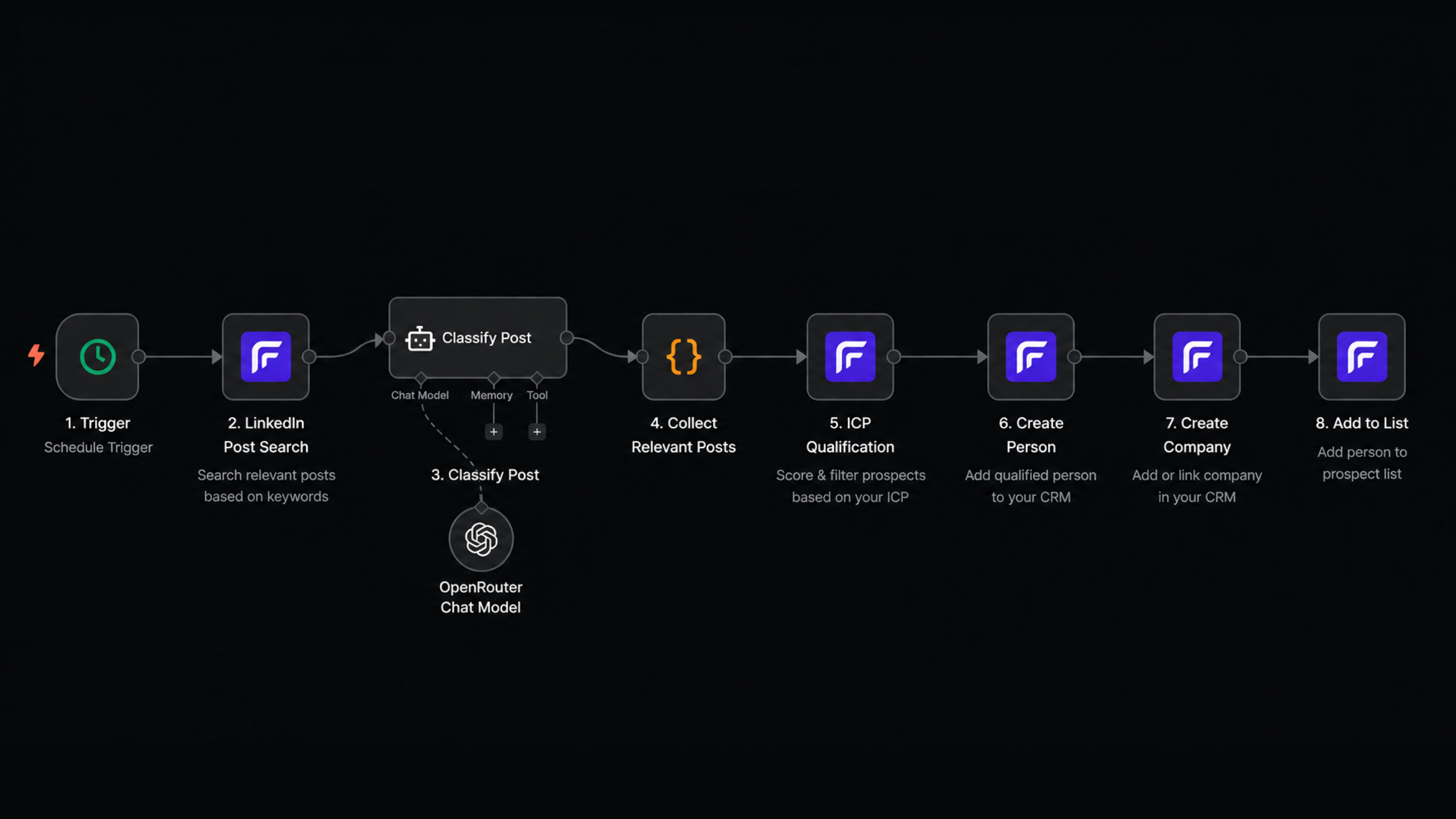
The rest of this guide walks through a complete n8n workflow for finding, qualifying, and enrolling LinkedIn commenters automatically using toflow.ai.
Step 1: Set up the schedule trigger
Start with an n8n Schedule Trigger node. Set it to run daily or weekly depending on how frequently posts appear in your target topics.
Daily schedules work well if you are monitoring active communities with high post volume. Weekly is usually enough for niche topics or narrow keyword sets. The key is consistency: the workflow should run reliably so no signals are missed between runs.
Step 2: Define your target keywords
Add a Code node immediately after the trigger. Use it to define the list of keywords the workflow will search for: industry terms your ICP uses, pain points your product solves, job titles that signal the right buyer.
Keep the list specific. A broad keyword like "sales" will return thousands of posts, most of them irrelevant. "AI SDR tools" or "outbound prospecting" will return fewer results, but they will be from people who are already in the conversation your product belongs in.
Step 3: Search for recent LinkedIn posts
Add a toflow node to search LinkedIn for recent posts matching your keywords. toflow.ai handles LinkedIn post discovery natively, so no third-party scraper or LinkedIn API access is needed.
The node returns a list of recent posts that match each keyword. Each result includes the post content, the author, and the list of people who engaged with it.
Step 4: Score post relevance with AI
Not every post that matches your keywords is worth pursuing. A post about "AI tools" from a job seeker is different from one written by a VP of Sales at a 200-person SaaS company.
Add an AI Agent node. Pass each post's content and ask the agent to score relevance from 0 to 100. The prompt should describe your ICP: what industries you target, what job titles matter, what kind of engagement indicates genuine buying interest. The agent returns a score with a short reason.
Follow this with an IF node. Keep only posts above your relevance threshold. This reduces the volume going into the enrichment step, which keeps costs low and results clean.
Step 5: Enrich each prospect
Add a toflow node to run enrichment on each commenter. toflow.ai's enrichment agent pulls job title, company, seniority level, location, and verified contact data across multiple sources automatically.
Enrichment is what makes the downstream AI scoring useful. A name and a LinkedIn URL are not enough to evaluate fit. Once you have the full profile, you can make a proper qualification decision.
Step 6: Score each prospect against your ICP
Add an AI Agent node. Feed in the enriched profile data alongside your ICP definition: company size range, seniority levels you target, industries you work with, geographies you cover. Ask the agent to return a score from 0 to 100 with a brief explanation.
The explanation matters as much as the score. When a rep picks up the contact later, knowing "VP of Sales at a 150-person SaaS company in the US, commented on a post about outbound tooling" is far more useful than a number alone.
Add an IF node after the scoring step. Prospects above your threshold move to enrollment. The rest are dropped.
Step 7: Enroll qualified prospects in toflow.ai
Add toflow nodes to create the company and person records. Write the enriched fields, the ICP score, and the source post URL alongside each record.
Then add a final toflow node to add the person to a prospect list for weekly review. Every entry on that list has arrived with full context: who they are, why they scored well, and which post triggered the workflow.
From here, the next step is outreach sequences. The first message can reference the LinkedIn post or topic the prospect engaged with, which makes it land as a follow-up to something they actually did rather than a cold approach.
Want this workflow running for your pipeline? Book a demo and we will set it up with you. 2 weeks free, no credit card required.
Other signals you can plug into the same pattern
LinkedIn post engagement is one example. The same three-part structure works with any structured data source.
Job listings. A company posting for a Head of Sales or a RevOps Manager is signalling investment in their go-to-market. Scrape job boards for these listings, enrich the hiring company, score the fit, and add decision-makers to your pipeline automatically.
News and funding. Companies announcing funding rounds or expansions are in a growth phase. A news API feed filtered by your target industries and company sizes can feed the same qualification and enrollment sub-workflow.
Inbound form fills. When someone submits a form on your site, route them through the same AI scoring workflow before they hit your pipeline. Not every form fill is worth a rep's time. Let the AI decide who gets actioned immediately and who goes into a nurture list.
The enrichment and scoring sub-workflows are the same in each case. Build them once, then point any new signal source at them.
toflow.ai supports all of these signal types natively. Book a demo to explore them. 2 weeks free, no credit card required.
Common mistakes to avoid
Using keywords that are too broad. A keyword like "sales tools" will surface thousands of posts. Most commenters will be irrelevant. Tighter keywords return fewer results but much higher match rates.
Skipping the post relevance step. It is tempting to skip the AI post scoring and just send all commenters through enrichment. The problem is cost and noise. Enriching hundreds of irrelevant people adds up quickly and floods your list with low-quality contacts. Score the posts first.
Storing the ICP score but not the reason. A score of 72 tells you a prospect passed. The reason tells you why, which is what a rep actually needs when writing the first message.
Not checking n8n execution logs. n8n workflows fail silently if an upstream node returns unexpected data. Check execution logs regularly in the first two weeks after a new workflow goes live.
Getting started
The toflow.ai n8n integration ships as an official community node: @toflow-ai/n8n-nodes-toflow. Install it from the n8n community nodes registry, connect your API token, and the toflow node is available across all your workflows.
If you want to see this running for your pipeline, book a demo and we will walk through it. 2 weeks free, no credit card required.
Frequently asked questions
How do I build an automated lead generation workflow with n8n? The core pattern is a scheduled trigger that watches a signal source, an AI agent that scores prospects against your ICP, and an enrollment step that creates qualified contacts in your outreach tool. Install the @toflow-ai/n8n-nodes-toflow community node to connect n8n directly to toflow.ai for prospecting, enrichment, and outreach.
What signals can trigger a lead generation workflow in n8n? Any structured data source works. LinkedIn post engagement, job board listings, news APIs, and inbound form submissions all follow the same pattern: collect raw signals, qualify with AI, enroll qualified contacts. The enrichment and scoring sub-workflows are reusable across all signal sources.
How does AI ICP scoring work in an n8n workflow? Use the AI Agent node with any LLM. Pass enriched prospect data and your ICP criteria in the prompt. The agent returns a score from 0 to 100. An IF node then routes prospects above your threshold into your pipeline and drops the rest.
What is the toflow.ai n8n community node? It is an official n8n community node package (@toflow-ai/n8n-nodes-toflow) that connects n8n to toflow.ai. It includes an action node for creating and updating contacts, companies, deals, and tasks, and a trigger node that starts workflows automatically when CRM events occur.
Does toflow.ai have a free trial? Yes. 2 weeks free, no credit card required.