
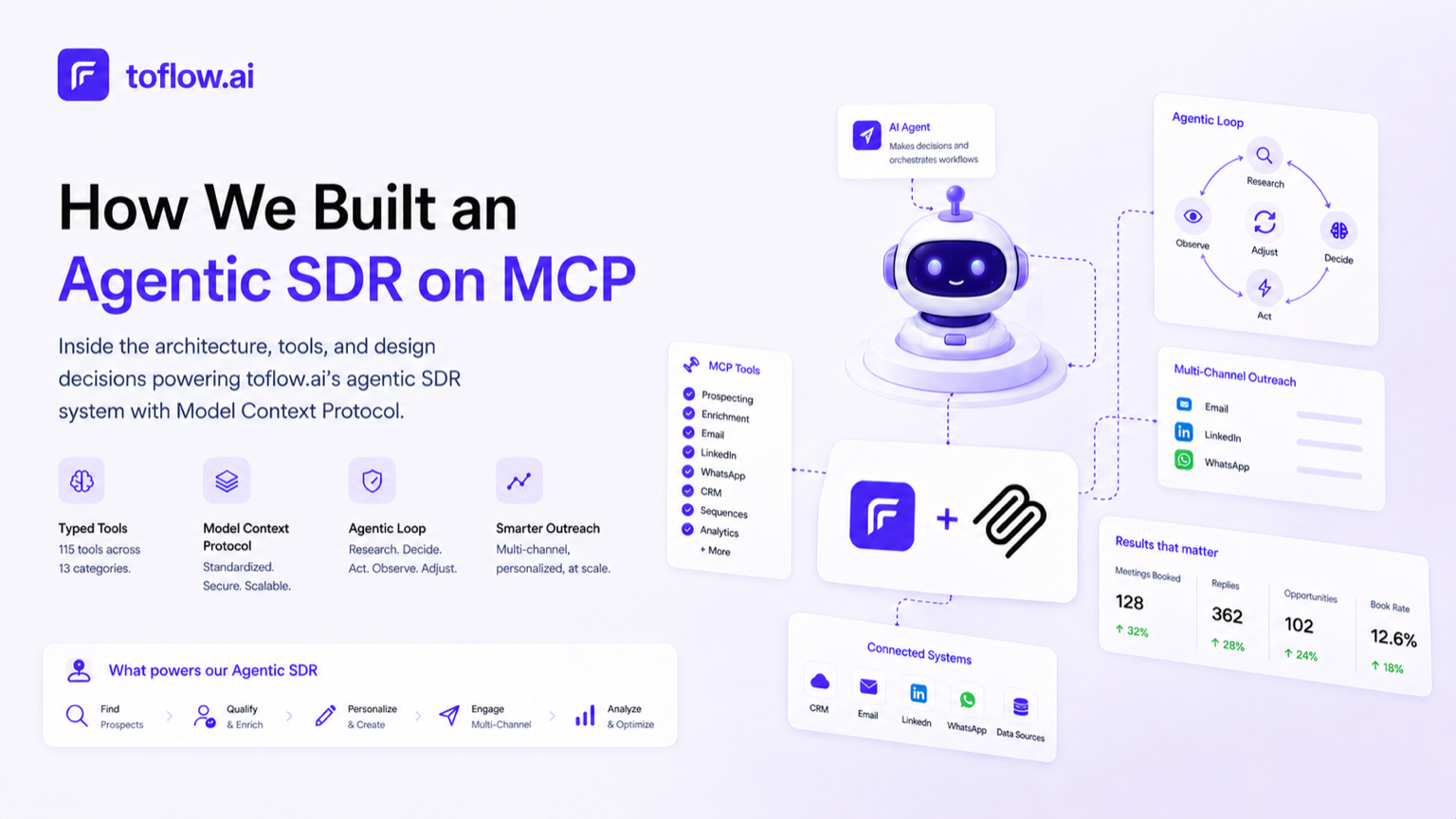

The promise of an AI sales agent is simple to describe: tell it who you want to reach, and it handles the outreach. The engineering to make that real is considerably less simple.
This is a breakdown of how to build an AI SDR with MCP, specifically how we did it at toflow.ai. It covers the AI SDR architecture, the decisions we made, where we ran into problems, and what building agentic systems on top of MCP actually looks like in practice. If you want to see it running before the technical breakdown, book a demo.
What We Were Building
An agentic SDR in 2026 needs to do more than send emails on a schedule. It needs to find the right prospects given a target description, verify contacts across multiple sources, research each account before outreach starts, write personalized messages, run outreach across email, LinkedIn, and WhatsApp, monitor responses, and route replies to humans when it makes sense to. Each of these steps involves external systems, decisions under uncertainty, and coordination across async processes running over days or weeks. Standard automation handles none of this well.
Why MCP
Model Context Protocol (MCP) is an open standard for connecting AI models to external tools and data sources. We chose it for two reasons.
Tool definitions are typed and structured. An AI SDR calls many different operations: search for prospects, enrich a contact, send an email, update a CRM record. In MCP, each is a typed tool with an explicit schema. The model knows exactly what parameters are required and what errors to expect. Compared to prose descriptions of what each function does, typed tool definitions are significantly more reliable at scale.
It separates intelligence from execution. The AI model handles reasoning: which contacts to prioritize, what angle to take, whether to follow up or wait. toflow's MCP server handles execution: writing to the CRM, sending the email, making the LinkedIn API call. Swapping the underlying model does not touch the execution layer at all.
The alternative to this approach is standard workflow automation. Tools like n8n or Zapier run a fixed sequence of steps you define in advance. Agentic AI works differently. Instead of a fixed path, the agent decides what to do based on what it observes at each step. For an SDR system where the right action depends on whether a prospect opened an email, accepted a connection, or visited your pricing page, a fixed workflow breaks down quickly. You cannot predefine a path for every signal combination.
The Architecture
Building an MCP server for sales means exposing every operation the agent might need as a typed tool. toflow's server covers 115 tools across 13 categories: prospecting, enrichment, email, LinkedIn outreach, WhatsApp, sequences, CRM records, automations, tasks, calls, notes, lists, and workspace management.
Connecting any MCP-compatible client looks like this:
{
  "mcpServers": {
    "toflow": {
      "type": "http",
      "url": "https://mcp.toflow.ai/mcp"
    }
  }
}
View the full setup guide or book a demo to see the AI SDR in action.
The Agentic Loop
The agentic SDR is not a single tool call. It is a loop: research, decide, act, observe, adjust. A complete SDR workflow in our system:
- search_prospects with ICP filters
- get_company_info for each account returned
- qualify_for_icp against company and prospect data
- find_email and find_phone for qualified contacts only (waterfall across 8 enrichment sources)
- get_connected_accounts to read load across email, LinkedIn, and WhatsApp accounts
- create_sequence selecting the right channel mix and mapping prospects to sending accounts
- enroll_contacts distributed across accounts based on available capacity
- get_sequence_analytics on a recurring basis to monitor performance
- On reply: categorize_reply and notify_rep if the signal is positive
Step 3 runs before any enrichment. The ICP qualification skill reads company profile and individual data together, checking things the initial search filters cannot: actual business model fit, role match against the buying pattern, disqualifying signals in recent news. Contacts that do not pass are dropped here. Email and phone lookup only runs on the ones that do, which keeps enrichment costs down and the enrolled list tight.
Step 5 is where channel and account decisions happen. toflow connects multiple sending accounts per workspace: email inboxes, LinkedIn profiles, WhatsApp numbers. The agent reads current load across all of them and decides the channel mix for each prospect and which sending accounts to use based on available headroom. Enrollment is distributed so no single inbox or profile hits its daily ceiling.
The architecture that makes this reliable is AI agent orchestration using an orchestrator and sub-agent pattern. This is what multi-agent sales automation looks like in production: not one monolithic agent trying to do everything, but a pipeline of narrow agents passing clean outputs to each other. One orchestrator agent owns the overall goal and fires a series of smaller sub-agents, each scoped to one task, passing output of each into the next. The prospecting sub-agent runs the search, the company research sub-agent pulls account context, the ICP sub-agent qualifies, the enrichment sub-agent finds contacts only for those that passed, the account allocation sub-agent maps each prospect to a sending account and channel mix, and the enrollment sub-agent creates the sequences. Each has a narrow responsibility and a clean input and output.
Steps 8 and 9 are event-driven, not part of the synchronous pipeline. The orchestrator does not poll. These fire when something happens and invoke the relevant sub-agent for that event.
The Hard Parts
Passing state between sub-agents cleanly. What each handoff contains matters. Too little and the next sub-agent lacks context to make good decisions. Too much and you are carrying dead weight through the pipeline. The ICP qualification sub-agent needs company profile and prospect data, not the raw search parameters. The enrichment sub-agent needs the qualified list and nothing else. Defining clean input and output shapes for each sub-agent turned out to be as much of the architecture work as the agent logic itself.
Rate limits across multiple APIs. How to handle rate limits in MCP is one of the parts most build logs skip over. LinkedIn, email providers, and WhatsApp all have different limits and different consequences for exceeding them. MCP rate limiting in our setup sits in the server layer, not at the agent level. Every tool that writes to an external channel has built-in rate limit management, queue logic, and exponential backoff. Sub-agents call the tool and get a result. The server handles whether to execute immediately or defer.
Handing off to the sequence engine. Once the enrollment sub-agent adds contacts to a sequence, the agent pipeline is done with that batch. The sequence engine schedules and sends each step, tracks opens and replies, adjusts timing, and automatically pauses when a reply comes in. Channel selection, step timing, and message variants are defined at enrollment. Everything after is the engine's responsibility, not the agent's.
Personalization at scale. With 200 contacts, personalization means 200 model calls. We run this in a dedicated sub-agent as a batch operation post-enrollment, separate from the planning pipeline. All planning and channel decisions are done before personalization runs, keeping the upfront pipeline fast.
Reply-driven agent invocation. When a reply comes in, the sequence pauses and that event fires back to the agent. The agent reads the reply in context: the prospect's history, which step they were on, what the message said. It then decides: route to a rep immediately, flag for follow-up in 30 days, or re-enroll under a different contact if it is a referral. The agent never replies directly. It decides and hands off.
What This Unlocks for Developers
With the MCP server exposed, any MCP-compatible client can build on top of toflow's outreach infrastructure. An AI assistant connected to toflow can research a company and draft a personalized cold email in a single prompt, build a prospect list and launch a sequence without leaving the chat interface, or handle reply routing based on intent classification.
The same 115 tools that external developers call are the ones our agentic SDR uses. There is no separate internal API. The external interface and the production system are the same thing.
Ready to set up your own AI SDR? Book a demo now and we will walk you through the whole system.
What We Would Do Differently
Design tool schemas for the model, not for engineers. Our early tool definitions were shaped by how internal APIs were structured: good parameter naming for engineers, confusing for models. We rewrote several tools with the model's perspective as the primary constraint. The descriptions matter as much as the schemas.
Separate read tools from write tools explicitly. Tools that both fetched data and triggered side effects depending on parameters led to unintended actions. Splitting them into distinct read and write tools eliminated that category of errors entirely.
Event-driven over polling. The original design polled for sequence status on a timer. Switching to event-driven triggers made the system cleaner and the agents faster to respond when something actually happened.
MCP Docs and Getting Started
The full tool reference for all 115 tools is in the toflow MCP docs. The server is live at https://mcp.toflow.ai/mcp and supports any MCP-compatible client including Claude, Cursor, and Windsurf.
If you are building outreach tooling, sales agents, or AI workflows that need access to a production outreach and CRM system, the MCP server is the fastest path to something running against real data.
View the setup guide · Book a demo now
Frequently asked questions
What is an MCP server and how does it work for outreach?
MCP (Model Context Protocol) is a standard that lets AI models call external tools through a consistent interface. An MCP server exposes a set of tools with defined schemas. When an AI assistant is connected to the server, it can call those tools using natural language. In the context of outreach, that means an AI agent can search for prospects, enrich contacts, create sequences, and enroll leads without leaving the chat interface or requiring manual import and export.
What is the orchestrator-subagent pattern in agentic sales automation?
The orchestrator-subagent pattern separates a complex workflow into a pipeline of narrow agents. One orchestrator owns the overall goal and fires a series of smaller subagents, each scoped to a single task. In an outbound pipeline, a prospecting subagent runs the search, a research subagent pulls account context, an ICP qualification subagent filters the list, an enrichment subagent finds contact details only for those that passed, and an enrollment subagent creates and launches the sequences. Each agent has a clean input and output. This approach is more reliable than one monolithic agent trying to handle everything.
Why does ICP qualification happen before email enrichment in the pipeline?
Enrichment has a per-contact cost. Running it on every prospect from a broad search wastes credits on contacts that will not pass qualification anyway. The pipeline runs ICP qualification first, using only the account profile and prospect data already available from the search. Email and phone lookup then runs only on contacts that passed, which keeps enrichment costs proportional to the actual qualified list rather than the raw search volume.
How does rate limiting work in an MCP-based outreach system?
Rate limiting in the toflow MCP setup sits in the server layer, not at the agent level. Every tool that writes to an external channel, whether LinkedIn, email, or WhatsApp, has built-in rate limit management, queue logic, and exponential backoff. Sub-agents call the tool and receive a result. Whether the action executes immediately or is deferred is handled by the server, keeping the agent logic clean and the external channel accounts protected.